American Set Design, by Arnold Aronson.
It's another $10 find from my local used-bookstore, The Iliad. It's a lot of interviews, which I may or may not read and a bunch of pictures, which I'm hoping will be very useful.
Stay-tuned folks, this sucker might actually turn out kind of cool one day!
Showing posts with label reference. Show all posts
Showing posts with label reference. Show all posts
Sunday, September 2, 2007

Tearsheet One, Rethinking Stage Design

I've been looking at stages online, puppet theater stages, "experimental" black box stages, all that jazz. I've really been out-to-sea, somewhat, trying to understand where we're going with this new look.
I've had no trouble grasping what this will do for us in terms of character design. There are lots of brilliant marionettes and puppet designs out there that I'm more than happy to use as jumping-off points for our character. I've had trouble understanding the space that the film will be taking place in.
The photos leading off this post are the first stagings that have made sense to me. I can start to see how to construct a space for our short to take place in, after looking at these and thinking about them a bit.
They're from a production of "The Peddler of Swaffham" by the Bognoggin Theatre Co., at the Witham International Puppet Festival. Witham is a little ways outside of London, in the UK. I've never been there, never heard of it before, never knew they had a puppet festival there. Oh the wonders of the internet.
That's my post for now. I think it lacks in some particulars, particularly the part that explains the "why" behind the change of direction, but that's just the way that it goes sometimes.
Cheers.
Sunday, May 20, 2007
City Layout

I just glanced up and saw the thumbnail of this image and for a second thought it was a spilled bowl of Fruity Pebbles.
Needless to say, this colors here in no way reflect the art direction we're going for. No, what this is, is simply a breakdown of all the visible buildings in the first shot. 53 visible buildings, counting only the garishly colored ones.
That's all for now. Tomorrow or in the next day or two I'll drop in a post about how we wound up with this layout and why we needed to have this reference document.
Thursday, May 17, 2007
Building lots of buildings
This first shot is gonna have a fair number of buildings in it.
I'm only about a third of the way through breaking down the scene into discrete units and I'm at 16 buildings that need close-to full modeling. It's no Coruscant, but it's gonna be pretty damned poly-dense.
In order to streamline the actual design & modeling of the buildings, as we have no dedicated concept artist, I started building a couple "schematics" or visual quick-references for how our buildings will look.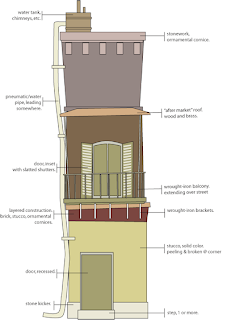
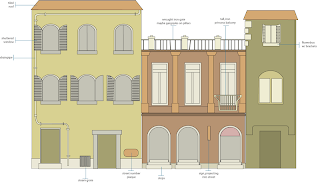 These are still very much WIP's but they're the beginning of our town and they've establishing a few rules for how things will fit together.
One of the next steps is for me to start organizing our photo reference library and creating meta data tags for each picture. Bridge is the "asset management" tool we're using and I'm totally a fan. It's turning our huge dump of photos into an easily searchable database of references that should allow us to quickly find modeling and texturing references as we work.
How we're doing it is as follows:
We have a central folder of images, mostly grabbed from Flickr, numbering somewhere in the hundreds and growing every day. This folder has plenty of sub-folders and the photos are all accurately named. For a while I thought that would be enough, but that's not turning out to be the case.
So what's happening now is that all new photos and, slowly, all our older photos are getting meta data tags, examples being "window shutter," "cobblestone," and "drainpipe." The really brilliant thing with Bridge is that it allows you to create live sets, like iPhotos Smart Sets, that are dynamically created every time you access them. What that means is that when it's time for me or James to model some window shutters, all we need to do is click on the live set labeled "Window Shutters" and every photo we have that's appropriately tagged will be referenced in that set.
Eventually we'll have live sets for every aspect of our models and textures right at our fingertips.
The most recent version of the reference folder lives on my iPod and I sync it to both my work and home computers a couple times each week, so that we've got copies. It's not failsafe, but it's better than nothing.
I'm only about a third of the way through breaking down the scene into discrete units and I'm at 16 buildings that need close-to full modeling. It's no Coruscant, but it's gonna be pretty damned poly-dense.
In order to streamline the actual design & modeling of the buildings, as we have no dedicated concept artist, I started building a couple "schematics" or visual quick-references for how our buildings will look.

 These are still very much WIP's but they're the beginning of our town and they've establishing a few rules for how things will fit together.
One of the next steps is for me to start organizing our photo reference library and creating meta data tags for each picture. Bridge is the "asset management" tool we're using and I'm totally a fan. It's turning our huge dump of photos into an easily searchable database of references that should allow us to quickly find modeling and texturing references as we work.
How we're doing it is as follows:
We have a central folder of images, mostly grabbed from Flickr, numbering somewhere in the hundreds and growing every day. This folder has plenty of sub-folders and the photos are all accurately named. For a while I thought that would be enough, but that's not turning out to be the case.
So what's happening now is that all new photos and, slowly, all our older photos are getting meta data tags, examples being "window shutter," "cobblestone," and "drainpipe." The really brilliant thing with Bridge is that it allows you to create live sets, like iPhotos Smart Sets, that are dynamically created every time you access them. What that means is that when it's time for me or James to model some window shutters, all we need to do is click on the live set labeled "Window Shutters" and every photo we have that's appropriately tagged will be referenced in that set.
Eventually we'll have live sets for every aspect of our models and textures right at our fingertips.
The most recent version of the reference folder lives on my iPod and I sync it to both my work and home computers a couple times each week, so that we've got copies. It's not failsafe, but it's better than nothing.
Subscribe to:
Posts (Atom)